

Description
Download VK Offline – Chrome Apps, VKontakte, Offline Access, Communication Tool
Overview
VK Offline is a desktop application designed to enhance access to VK (VKontakte) communication features, particularly for users who rely on fast, reliable messaging and contact management. Built as a Chrome App, it enables users to maintain access to their VK chats and contact data even when internet connectivity is unavailable. This functionality is especially valuable for professionals, students, and frequent VK users who need uninterrupted communication, whether working remotely or in low-connectivity environments.
The software integrates seamlessly with the VK ecosystem, offering a streamlined interface for managing correspondence and contacts without constant reliance on a live network connection. By caching messages and contact information locally, it ensures continuity in communication workflows. This makes it a practical solution for individuals who depend on VK for personal or professional interactions, including content creators, community managers, and international users maintaining cross-border connections.
Developed by VK, the same company behind the popular social network VKontakte, the app reflects a strategic effort to extend core platform capabilities beyond the browser. While specific details about the development team or additional features are not provided, the app’s alignment with VK’s broader ecosystem suggests a focus on usability, integration, and user retention. It serves as a bridge between web-based functionality and the convenience of a desktop experience.
Key Features & Capabilities
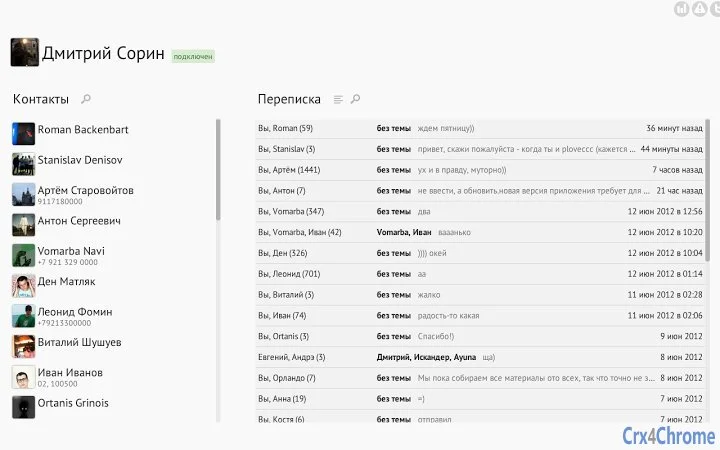
- Offline Messaging Access – Store and access VK chat history locally, allowing users to read and draft messages without an active internet connection.
- Contact Management – Maintain a synchronized local copy of contacts, enabling quick lookup and messaging even when offline.
- Chrome App Integration – Leverage the Chrome ecosystem for lightweight, cross-platform deployment across Windows, Mac, and Linux.
- Fast, Lightweight Interface – Designed for minimal resource usage, ensuring smooth performance on a variety of systems.
- Seamless Sync on Reconnection – Automatically syncs messages and contact updates when a network connection is restored.
These features support real-world workflows such as drafting messages during travel, reviewing conversations during offline study sessions, or managing community interactions without constant online presence. The app’s design emphasizes efficiency, allowing users to prioritize communication without being constrained by network availability. Its lightweight nature makes it suitable for use on older hardware or systems with limited processing power.
User Interface, Workflow & Performance
The user interface of VK Offline follows the familiar design language of Chrome Apps, offering a clean, minimal layout focused on core functionality. Navigation is straightforward, with clearly labeled sections for chats, contacts, and settings. Users can quickly switch between conversations and access contact details through intuitive menus and search functions.
Workflow efficiency is enhanced by the app’s ability to retain chat context and contact data locally. This reduces the need to reload or re-authenticate when returning to the application after a network disruption. The app’s performance is expected to be stable, given its lightweight footprint of 10 MB and integration with the Chrome runtime environment. However, exact performance details such as CPU or RAM usage were not specified by the developer.
Stability is likely supported by the robust infrastructure of the Chrome platform, which manages updates and background processes. Users can expect consistent behavior across sessions, though real-world performance may vary based on system configuration and network conditions. The developer did not provide additional system requirements or resource usage metrics.
Compatibility & System Requirements
VK Offline is compatible with Windows, Mac, and Linux operating systems, offering broad cross-platform support. The app is designed as a Chrome App, meaning it requires the Google Chrome browser to be installed and running on the host system. The software version is 1.0.0, with a file size of 10 MB, indicating a compact and efficient installation.
Exact system requirements were not listed by the developer. Compatibility information is limited to the supported platforms. It is recommended to ensure that the system meets the minimum requirements for running Google Chrome, as the app depends on the browser’s runtime environment. The developer did not specify hardware requirements such as processor speed, RAM, or storage space beyond the installation size.
Pros and Cons
Pros
- Enables access to VK chats and contacts without internet connectivity
- Lightweight design with only 10 MB installation size
- Available for Windows, Mac, and Linux platforms
- Seamless integration with the Chrome browser and VK ecosystem
- Automatic sync when reconnected to the internet
Cons
- Requires Google Chrome to be installed and running
- No official support for mobile devices
- Exact system requirements not disclosed
- Limited to VK and email-style communication features
- Offline functionality depends on local data storage
FAQ Section
Is VK Offline available for mobile devices?
Currently, VK Offline is designed as a desktop application for Windows, Mac, and Linux systems. It is not available for mobile platforms.
Does VK Offline require an internet connection to function?
While an internet connection is needed to send messages and sync data, the app allows access to existing chats and contacts offline. You can read messages and draft replies without being online.
How does the app handle data security?
As a Chrome App, VK Offline uses the security model of the Chrome browser, including sandboxing and encrypted storage. However, specific details about data encryption or privacy policies were not provided by the developer.
Can I use VK Offline without a VK account?
No, access to the app’s core features requires a valid VK account. The app functions as an extension of the VK platform and does not support standalone usage.
How often does the app update?
Updates are managed through the Chrome Web Store. The app will automatically update when a new version is released, provided that automatic updates are enabled in Chrome settings.
Final Thoughts + CTA
VK Offline presents a practical solution for users who depend on VK for communication and contact management but face frequent network interruptions. Its ability to provide offline access to chats and contacts significantly improves workflow continuity, especially in environments with unstable internet. The app’s lightweight design, cross-platform availability, and seamless integration with Chrome make it a compelling choice for VK users seeking a desktop experience.
While limitations exist—such as the dependency on Google Chrome and the lack of mobile support—the benefits of uninterrupted access and efficient data handling outweigh these constraints for the target audience. For professionals, students, and frequent VK users, this tool offers a reliable way to stay connected without being tethered to the web.
Download VK Offline now
Guides & Tutorials for VK Offline App for Chrome
How to install VK Offline App for Chrome
- Click the Preview / Download button above.
- Once redirected, accept the terms and click Install.
- Wait for the VK Offline App for Chrome download to finish on your device.
How to use VK Offline App for Chrome
This software is primarily used for its core features described above. Open the app after installation to explore its capabilities.
User Reviews for VK Offline App for Chrome 0
No reviews found





